

Best AI Tools to Automate Daily Tasks in 2025
These AI tools can save 2–5 hours every day — here’s what people in 2025 actually use.
Why Daily AI Automation Matters Now
Life in 2025 moves fast. Most of us juggle emails, meetings, planning, content creation, research, admin work, and endless notifications. Almost 70% of this is repetitive — and now fully automatable.
AI assistants can plan your day, reply to messages, summarize meetings, organize files, run workflows, and even make decisions. The real impact: more time, less stress, and a smoother daily life.
Below is the Discover-optimized, deep-yet-scannable list of the best AI tools to automate your personal, professional, and household tasks in 2025.
1. ChatGPT 5.1 — Your All-Purpose Daily Brain
What it automates
- Email replies
- Task planning
- Writing
- Notes
- Content creation
- Research
- Customer replies
- Coding
- Idea generation
- Document cleanup
Real automation
Ask: “Plan my entire day based on these tasks and my Google Calendar.”
ChatGPT delivers a full day plan — with timing, breaks, priorities, and reminders.
Time saved daily
1–2 hours for most people.
2. Notion AI — Turns Messy Notes Into a Clean System
What it automates
- Notes
- Tasks
- Meeting summaries
- Study plans
- Project tracking
- Documents
- SOPs
- To-do lists
How people actually use it
- Paste messy notes → get clean summaries
- Add tasks → Notion organizes priorities
- Write ideas → Notion converts into structured documents
Best for: students, creators, solopreneurs, teams.
3. Zapier AI — The Automation Engine Behind Everything
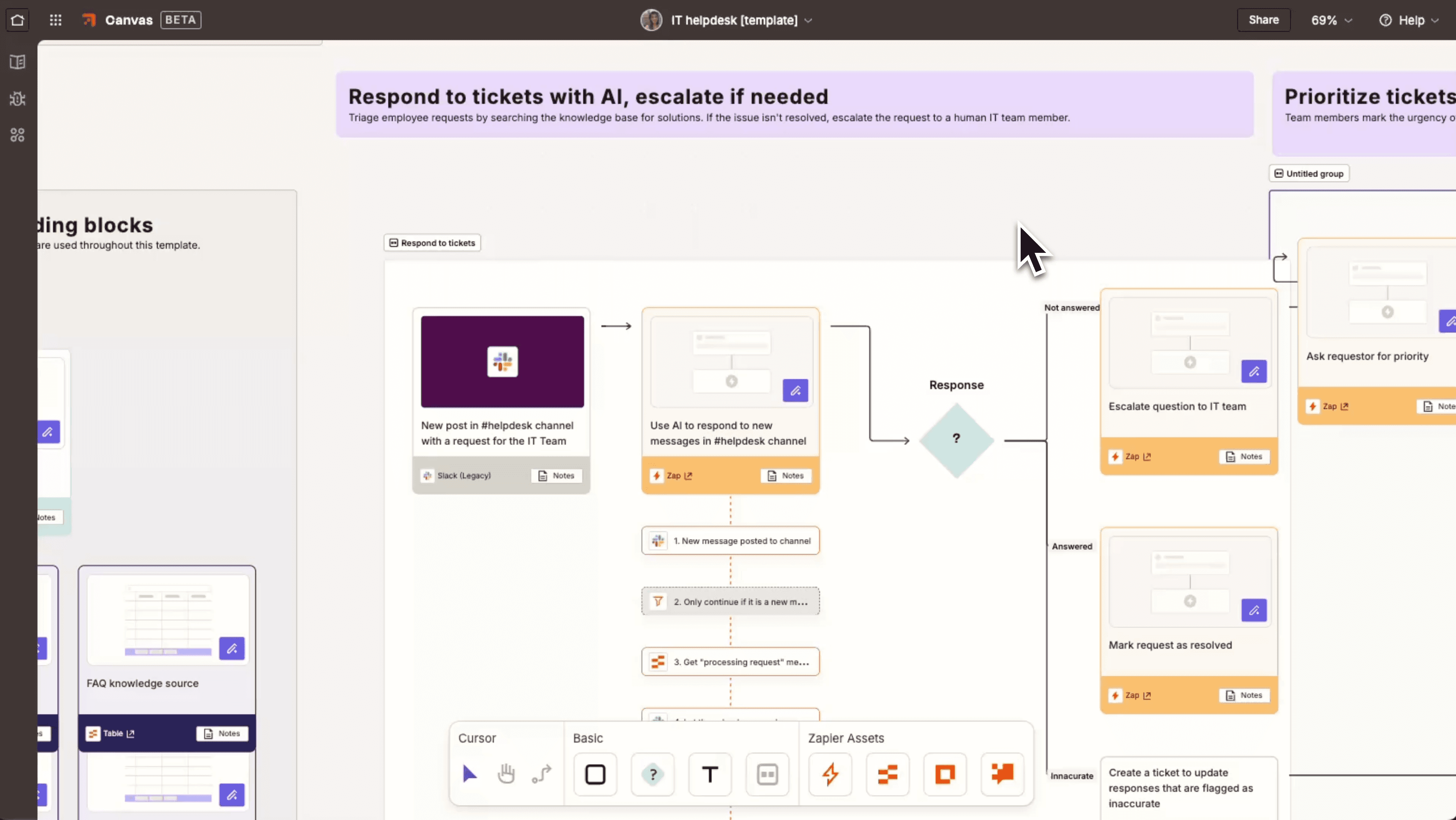
What it automates
- Emails
- Sheets
- CRMs
- Notion
- Slack
- Lead management
- Google Drive
- E-commerce operations
Real examples
- New email → save attachment to Drive
- New customer → auto-send welcome email
- New form fill → auto-add to Notion
Zapier removes hundreds of repetitive tasks every month.
4. Make.com — Visual Automation for Creators & Teams
What it automates
- Social media posting
- Client onboarding
- Data syncing
- Email campaigns
- AI content workflows
Real example
Publish a reel → auto-post to Instagram + YouTube + TikTok + Facebook instantly.
5. Google Gemini — Instant Research & Analysis
What it automates
- Market research
- Competitor analysis
- Product comparisons
- Document summaries
- Recommendations
Ask: “Compare these 5 products and tell me which one suits me best.”
Gemini gives a clean comparison + verdict.
6. Perplexity AI — Your Fast, Fact-Based Research Partner
What it does
- Answers questions (with sources)
- Summaries
- Topic comparisons
- Academic help
- Trends
- Quick learning
Creators, professionals, and students use it daily.
7. Microsoft Copilot — The Workday Automation Assistant
Automates
- PowerPoints
- Excel sheets
- Emails
- Meeting notes
- Data analysis
- Word documents
Example:
“Create a PowerPoint about AI trends.” → Copilot builds all slides instantly.
8. CalendarAI — Zero-Manual Scheduling
Automates
- Meeting coordination
- Best time selection
- Follow-up scheduling
- Invite sending
No more back-and-forth emails.
9. Reclaim AI — Automates Your Entire Daily Routine
What it does
- Automatically schedules tasks
- Finds time for habits
- Protects focus time
- Syncs calendars
Example:
Add “Gym 4x week” → Reclaim finds slots and auto-schedules.
10. Otter.ai — Automatic Meeting Notes
Automates
- Live transcriptions
- Summaries
- Highlights
- Action items
Perfect for professionals and remote workers.
11. Read.ai — Meeting Intelligence
What it provides
- Sentiment insights
- Speaking time
- Engagement analytics
Useful for managers and teams.
12. CastMagic — Turns One Video Into 20 Pieces of Content
Automates
- Reels
- Quotes
- Blog posts
- Carousels
- Newsletters
Great for creators and coaches.
13. Opus Clip — Viral Shorts Automatically
What it does
- Finds viral moments
- Creates auto-captioned clips
- Resizes for all platforms
A must-have for YouTube, Instagram, TikTok creators.
14. ElevenLabs — Auto Voiceovers in Studio Quality
Automates
- Narrations
- Ads
- Videos
- Audiobooks
- Dubbing
Great for faceless creators and businesses.
15. Runway / Pika — Instant Video Creation
Automates
- Short videos
- Ads
- Explainers
- Product videos
Just give a prompt → get a ready video.
16. Canva AI — One-Click Design System
Automates
- Thumbnails
- Posters
- Reels
- Carousels
- Branding
- Social templates
Magic Design + AI image tools = huge time savings.
17. Grammarly — Auto-Upgrades All Your Writing
Automates
- Grammar
- Tone
- Clarity
- Readability
Perfect for students and professionals.
18. Tidio AI — Automate Customer Support
What it handles
- FAQs
- Live chat
- Smart replies
- WhatsApp/Messenger support
Great for e-commerce and service businesses.
19. MailerLite AI — Automate Your Entire Email Marketing
Automates
- Email copy
- Campaigns
- Scheduling
- Segmentation
- Personalization
Email marketing in minutes.
20. Mixo — Build Websites Automatically
What it does
- Creates landing pages
- Generates content
- Captures email leads
- Launches MVPs fast
Perfect for entrepreneurs.
A Fully Automated Day Using AI (Real Example)
Morning
1. AI plans your day
ChatGPT or Reclaim builds your schedule.
2. AI summarizes your inbox
Shortwave + ChatGPT.
3. AI handles meetings
Otter + Read.ai create summaries and tasks.
Work Hours
4. AI handles research
Perplexity + Gemini.
5. AI generates content
ChatGPT + Canva + Runway/Pika.
6. AI automates posting
Make.com + Buffer.
7. AI updates your CRM
Zapier + Notion.
Evening
8. AI organizes your notes
Notion AI.
9. AI plans tomorrow
ChatGPT: “Plan my next day based on today.”
Top 5 AI Automations Everyone Should Enable
- Email sorting + auto replies
- Meeting summaries
- Content repurposing
- Task prioritization
- Automatic file organization
Benefits of AI Automation
- Save 2–5 hours daily
- Reduce stress
- More productivity
- Faster learning
- Cleaner workflows
- Scale without burnout
Who Should Use These Tools
Students
Freelancers
Creators
Entrepreneurs
Employees
Agency owners
Remote workers
E-commerce sellers
Coaches
In short: everyone.
Conclusion
AI in 2025 isn’t optional — it’s daily infrastructure.
People who automate their routine get more done, feel less overwhelmed, and build more disciplined, successful lives.
Start by automating just three: email, notes, scheduling.
Within a week, you’ll feel the difference.
Your AI team is ready — let it work for you.

An AI researcher who spends time testing new tools, models, and emerging trends to see what actually works.

